Exportar uma medição do subempreiteiro
For Procore Customers in the United States
 When your company applies the 'Owners English' or 'Specialty Contractors English' point-of-view dictionary, you'll see different tool names and term changes in the user interface. Learn how to apply the dictionary options.
- To learn the differences: Show/Hide
Objetivo
Para exportar uma fatura de subcontratado para um formato de arquivo compatível.
Histórico
Se quiser fazer download de uma cópia digital de um medição do subempreiteiro, você pode optar por exportar a fatura em um formato CSV (Valores separados por vírgula) ou em PDF (Portable Document File). Você também pode fazer download de um PDF que inclua qualquer anexo selecionado no formato de arquivo ZIP ou como um único PDF.
Coisas a considerar
- Permissões de usuário necessárias:
- Você deve ser um administrador de faturas.
- Formatos de arquivo compatíveis:
- CSV
- PDF com anexos
- Limitações:
- Os anexos adicionados a um campo personalizado NÃO são compatíveis com a opção "PDF com anexos" no momento. Para saber mais, consulte O que são campos personalizados e quais são as ferramentas do Procore compatíveis com esse recurso?
Pré-requisitos
Passos
Exportar um PDF
- Acesse a ferramenta Medições do projeto.
- Clique na guia Subempreiteiro .
- Encontre a fatura com a qual deseja trabalhar.
- Clique no link N.º da fatura para abri-la na ferramenta Compromissos do projeto.
- Clique em Exportar > PDF.

O Procore abre o PDF em uma guia separada em seu navegador Web. Os controles para salvar ou baixar o arquivo em seu computador dependem do visualizador ou leitor de PDF instalado no navegador da Web. Para obter ajuda com as configurações do navegador Web, entre em contato com o departamento de TI da sua empresa.
Exportar um PDF com anexos
- Acesse a ferramenta Medições do projeto.
- Clique na guia Subempreiteiro .
- Encontre a fatura com a qual deseja trabalhar.
- Clique no link N.º da fatura para abri-la na ferramenta Compromissos do projeto.
- Clique em Exportar > PDF com anexos.
O Procore abre a janela Selecionar e organizar itens . - Escolha os anexos a serem incluídos marcando as caixas de seleção de anexo:
- Opcional. Organize a ordem dos anexos no PDF passando o cursor do mouse sobre o lado esquerdo do item até que a barra de captura apareça. Em seguida, pegue o componente e mova-o para o posição desejado.
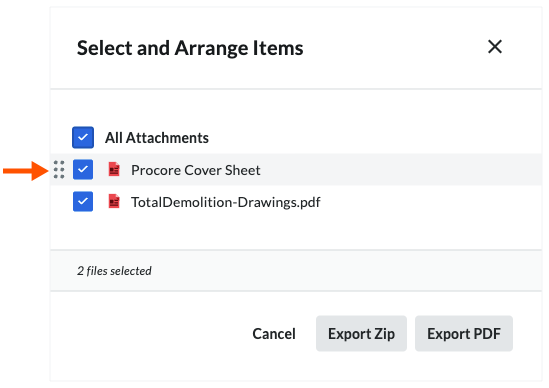
- Clique em um destes botões:
- Cancele. Cancela a exportação.
- Exportar CEP. Exporta a fatura e todos os anexos de arquivo como PDFs em um arquivo CEP e envia o arquivo CEP para você em um e-mail.
- Exportar PDF. Faça download da fatura e dos anexos selecionados em seu computador como um único PDF.
Exportar um CSV
- Acesse a ferramenta Medições do projeto.
- Clique na guia Subempreiteiro .
- Encontre a fatura com a qual deseja trabalhar.
- Clique no link N.º da fatura para abri-la na ferramenta Compromissos do projeto.
- Clique em Exportar > CSV.
O Procore fará download de uma cópia do CSV da fatura para seus computadores Fazer download do local.
Exemplos: arquivos CSV e PDF
Exemplos
Esses exemplos mostram as versões CSV e PDF de uma fatura.
CSV

Uma fatura em PDF possui várias páginas: uma folha de resumo do documento e pelo menos uma (1) folha de detalhes do documento.
Folha de resumo do documento

Folha de detalhes do documento

Veja também
 .
.