

Definir ou liberar retenção em uma fatura ao proprietário na ferramenta Contratos Principais (legado)
Procore interno SOMENTE
Esta página detalha a experiência legada do faturamento do proprietário. Com a experiência legada, essas etapas também podem ser executadas com a ferramenta Medições. Consulte Definir ou liberar retenção em uma fatura ao proprietário (legado). Não há página equivalente na experiência modernizada. Em vez disso, a capacidade de editar valores de retenção agora faz parte da seção Editar faturas ao proprietário na seção Atualizar os itens de linha usando o método contábil do contrato.
Objetivo
Definir ou liberar retenção para itens de linha em um medição ao proprietário com a ferramenta Contratos Principais.
Fundo
Coisas a considerar
- Permissões de usuário necessárias:
- Permissões de nível "Administrador" na ferramenta Contratos Principais do projeto.
Pré-requisitos
Passos
- Acesse a ferramenta Contratos Principais do projeto.
- Clique na guia Faturas .
- Localize o medição ao proprietário com o qual deseja trabalhar.
- Clique na guia Detalhes .
- Clique no botão Editar .
- Escolha um dos seguintes?
Definir retenção em todos os itens de linha
- Under Set Retainage on All Line Items, do the following:
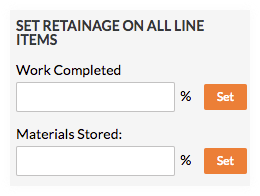
- Enter the percentage to withhold in the Work Completed box.
- Click Set.
- Enter the percentage to withhold in the Materials Stored box. To learn more, see How do I bill for stored materials in Procore? (Legacy)
- Click Set.
Liberar retenção em todos os itens de linha
- Under Release Retainage on All Line Items, do the following:

- Enter the percentage to release in the Work Completed box.
- Click Release.
Veja também
If you would like to learn more about Procore's prime contract software and how it can help your business, please visit our construction contract management software product page  .
.
.